Explorance Metrics That Matter 10.0: Prove Your Training Is Closing the Skills Gap


For learning teams, measuring training impact now means looking beyond participation, completion, or satisfaction. As organizations place greater emphasis on workforce skills, L&D teams need clearer ways to understand which capabilities their learning programs are designed to develop and whether learners believe they gained them.
That shift requires more than adding skills to a learning catalog. It requires a connection between learning experiences, the skills they are designed to develop, learner validation, and the data needed to prove that learned skills support business outcomes.
The Explorance Metrics That Matter 10.0 release expands the platform’s ability to connect learning experiences with the skills they are designed to develop, capture learner perspectives on skills gained, and turn that information into actionable insight.
“The shift toward skills is changing how organizations think about the role of L&D. It creates an opportunity to move beyond measuring learning activity and toward understanding how learning contributes to the capabilities organizations need.”
— Explorance Product Team
What’s New in MTM 10.0
1. Build a Structured Skills Taxonomy with Skills and Skill Categories
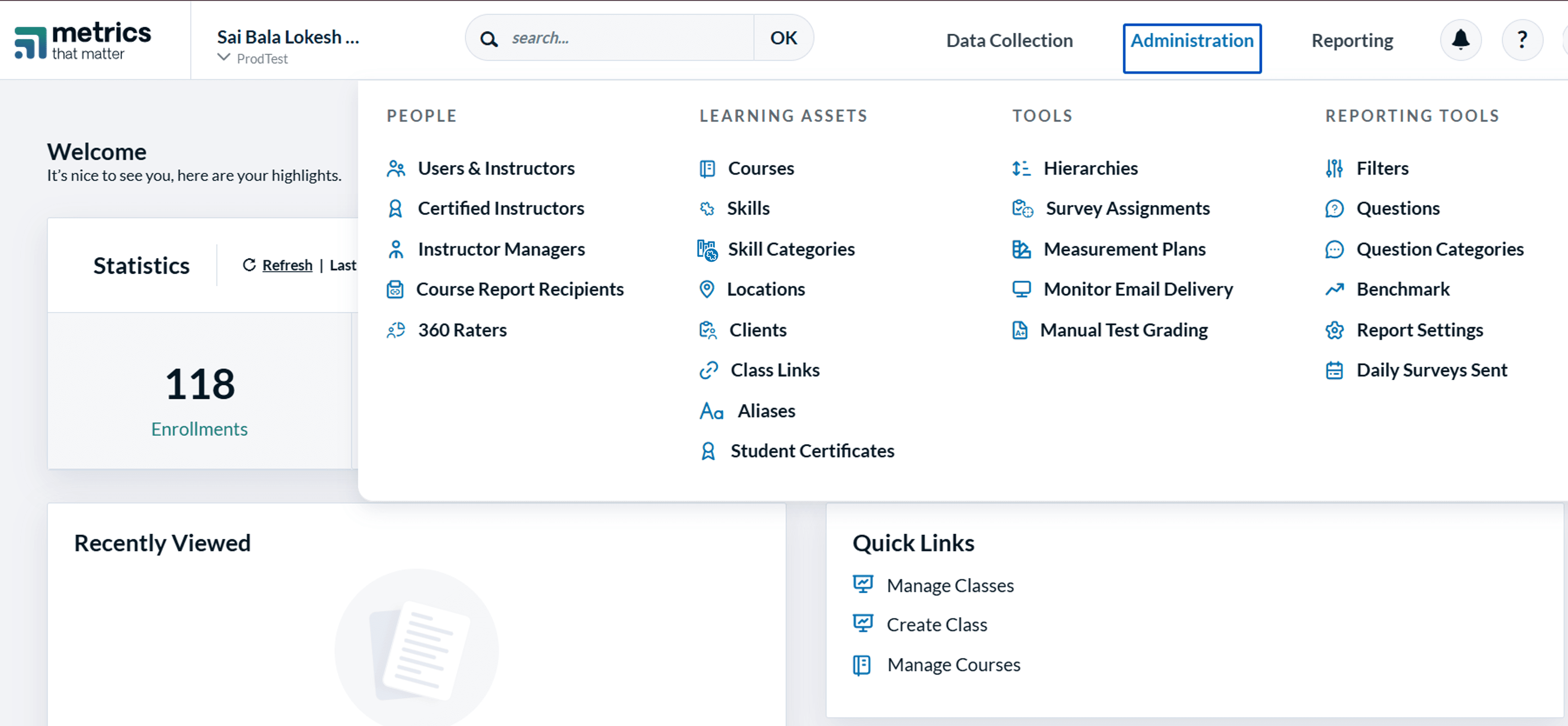
MTM 10.0 introduces Skills and Skill Categories, giving organizations a structured way to define and organize the competencies their training programs develop.
A Skill represents a specific competency, such as Communication, Coaching, or Adaptability. Each skill belongs to one Skill Category, creating a consistent taxonomy across an organization. Teams can create custom skills, assign them to categories, and manage them from a centralized skills catalog.
MTM 10.0 includes 30 standard skill categories that are benchmarkable, while organizations can create unlimited custom categories to support their own learning frameworks.
2. Connect Courses to the Skills They Develop
With Course-to-Skill Mapping, organizations can directly associate skills with the courses that develop them.
Teams can map multiple courses to a single skill and review and manage those mappings as their learning catalog evolves. These mappings also power the new Skills question and reporting capabilities in MTM 10.0.
3. Capture Learner-Reported Skills with the New Skills Question
MTM 10.0 brings skills directly into learner feedback with a new Skills question type.
Available through the MTM survey question library, the Skills question automatically pulls its response options from the skills mapped to the learner’s course. This means survey authors do not need to manually configure skill choices for each survey.
Organizations can set minimum and maximum selection requirements and choose whether the question is mandatory or optional. If no skills are mapped to a course, the question is automatically skipped.
4. Scale Your Skills Framework
Managing a skills taxonomy can involve hundreds of skills and course relationships. MTM 10.0 simplifies this process with bulk skill management through Excel.
Using a single Excel template, administrators can import existing skills taxonomies, create and edit skills, and map them to courses in one pass. This allows organizations to bring the taxonomies they have already developed into MTM without having to recreate them manually. Changes can be previewed before they are committed, helping teams manage large skills catalogs more efficiently.
5. Turn Skills Feedback into Actionable Reporting
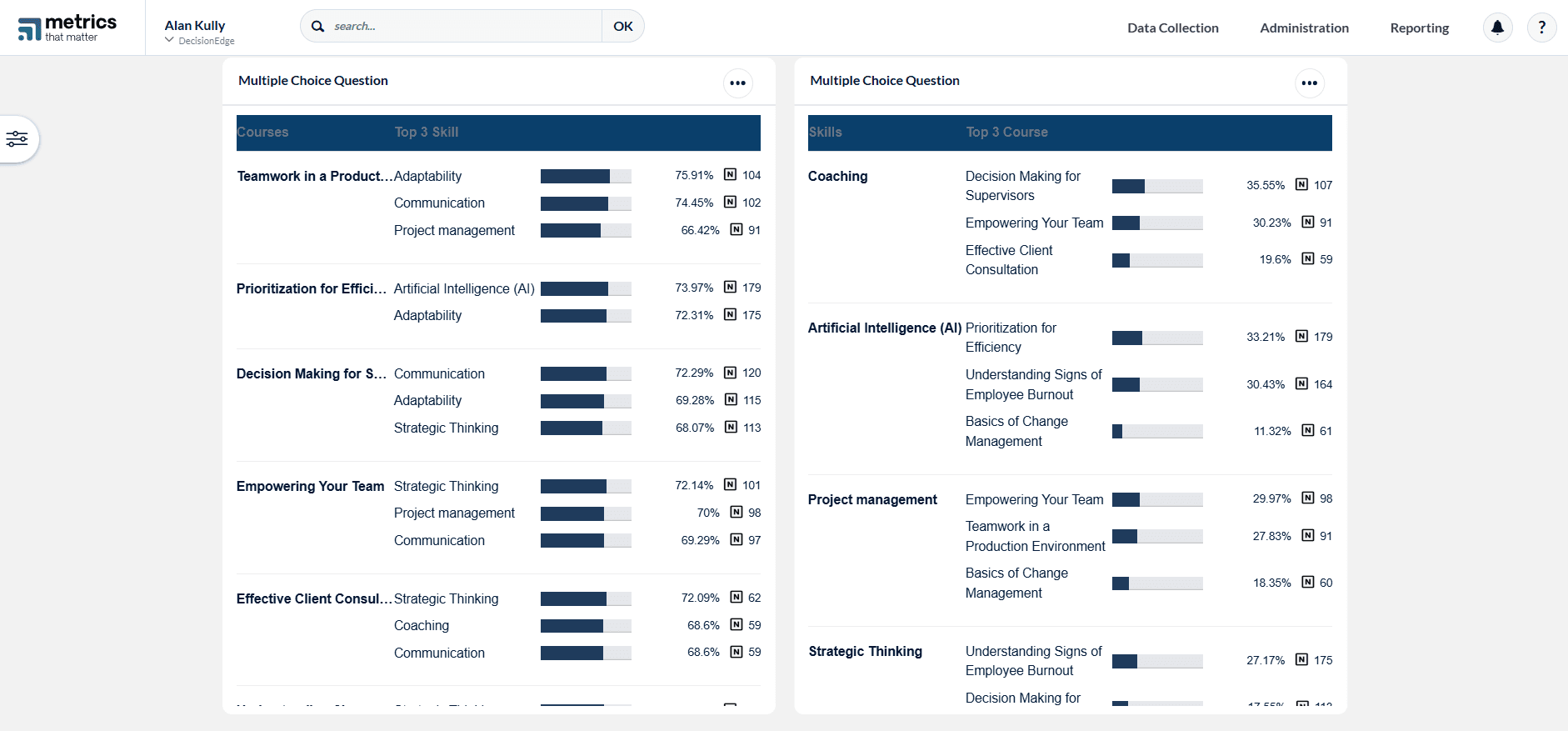
MTM 10.0 introduces new Skills Reporting capabilities that help organizations understand the relationship between courses and learner-reported skills.
A new dashboard widget provides visibility into top skills by course and top courses by skill, along with the percentage of learners reporting each skill and response counts. Results can be filtered by course to help teams explore their skills data in greater detail.
Skills data is also available through Data Extract with the new Skill Selected column. Each selected skill appears as a row in the extract, making learner-reported skills available wherever Data Extract is built.
More in MTM 10.0
Get Faster Answers with the AI-Powered Help Assistant
MTM 10.0 also introduces a new way to find information within the MTM Help Center.
The MTM Help Assistant is an AI-powered chatbot that allows users to ask questions and receive answers sourced directly from MTM documentation.
Available directly within the Help Center, the assistant provides immediate answers to product questions based on the Help Center documentation without requiring users to submit a support ticket.
Key Benefits of MTM 10.0
For Learning Administrators and Program Owners
- Build a consistent framework for understanding the skills connected to learning programs.
- Connect courses with the capabilities they are designed to develop.
- Capture learner perspectives on the skills they believe they gained.
- Manage and analyze skills across learning programs at scale.
For Learning Analysts and Measurement Teams
- Understand which skills learners report gaining across courses.
- Identify patterns between courses and learner-reported skills.
- Bring skills data into broader analysis through Data Extract.
- Use response data to add context to skills reporting.
For Learners
- Reflect on the skills they believe they gained through learning experiences.
- Provide feedback that contributes to a broader understanding of learning outcomes.
For All MTM Users
- Get faster answers to product questions with the AI-powered MTM Help Assistant.
- Access skills measurement capabilities as part of the MTM platform.
Ready to Put Skills Measurement into Practice?
Connect with your Customer Success Manager to strategize how MTM 10.0’s skills capabilities can support your learning measurement goals and configure them for your organization.
Related Articles






Learn more about Explorance's products, solutions, and the company.

'%3e%3cpath%20d='M5.83968%2010.4004L7.09855%2015.7752L1.29959%2021.5843L1.23852%2021.642C1.21137%2021.6692%201.18762%2021.6997%201.16047%2021.7235C0.481112%2022.4372%200.0747675%2023.3674%200.0127211%2024.3508C-0.0493254%2025.3343%200.236888%2026.3082%200.821155%2027.1016C0.885626%2027.1865%200.950095%2027.2713%201.01796%2027.3493C1.0306%2027.3649%201.0442%2027.3796%201.05868%2027.3935C1.16422%2027.5192%201.27755%2027.6382%201.398%2027.7497L1.4455%2027.7939L1.67624%2028.0246L9.14125%2035.4896L20.0334%2024.6043L5.83968%2010.4004Z'%20fill='white'/%3e%3cpath%20d='M13.1078%2039.4493L9.78247%2042.761L15.1539%2041.5055L20.98%2047.3113L21.0411%2047.369L21.1225%2047.4504C21.8375%2048.1288%2022.7681%2048.5345%2023.7517%2048.5965C24.7354%2048.6585%2025.7096%2048.373%2026.5041%2047.7897C26.5889%2047.7253%2026.6737%2047.6608%2026.7518%2047.5929L26.7959%2047.5522C26.9233%2047.4401%2027.0434%2047.3199%2027.1556%2047.1925C27.1709%2047.1795%2027.1845%2047.1647%2027.1963%2047.1484L27.4304%2046.9211L34.8954%2039.4561L23.9999%2028.5605L13.1078%2039.4493Z'%20fill='white'/%3e%3cpath%20d='M34.8921%209.76194L38.2072%206.45019L32.8358%207.70228L27.0199%201.89315L26.9588%201.83207C26.9317%201.80492%2026.9045%201.78117%2026.8808%201.75403C26.1658%201.07561%2025.2352%200.669967%2024.2515%200.607946C23.2679%200.545924%2022.2937%200.831473%2021.4992%201.41471L21.2515%201.61491L21.204%201.65902C21.0833%201.7643%2020.9699%201.87767%2020.8646%201.99833L20.8239%202.04245L20.5932%202.2664L13.1282%209.73141L23.9999%2020.6473L34.8921%209.76194Z'%20fill='white'/%3e%3cpath%20d='M47.1789%2022.1067C47.1181%2022.0204%2047.0524%2021.9377%2046.9821%2021.859L46.9414%2021.8149C46.8301%2021.6867%2046.7099%2021.5665%2046.5817%2021.4552L46.5376%2021.4145L46.3069%2021.1838L38.8419%2013.7188L27.9531%2024.6041L38.8419%2035.4928L42.157%2038.8046L40.9015%2033.4332L46.7073%2027.624L46.7683%2027.5663L46.8464%2027.4815C47.5267%2026.769%2047.9337%2025.8392%2047.9958%2024.856C48.0579%2023.8727%2047.771%2022.8992%2047.1857%2022.1067H47.1789Z'%20fill='%230050C1'/%3e%3c/g%3e%3cdefs%3e%3cclipPath%20id='clip0_6641_12689'%3e%3crect%20width='48'%20height='47.9966'%20fill='white'%20transform='translate(0%200.603516)'/%3e%3c/clipPath%3e%3c/defs%3e%3c/svg%3e)